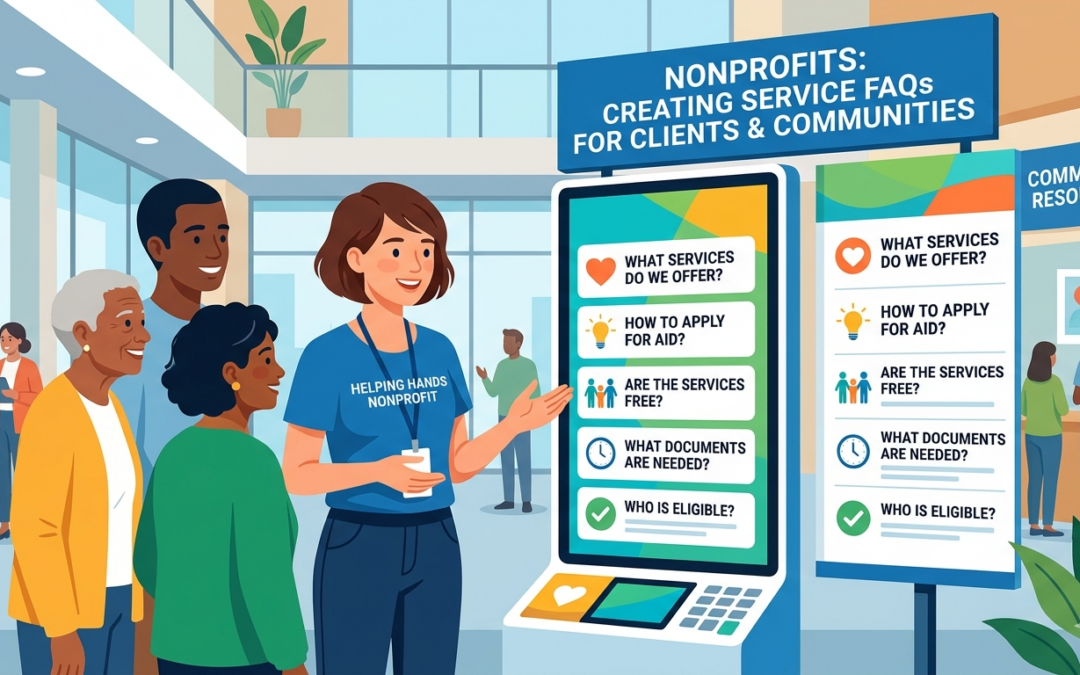
Nonprofits: Creating Service FAQs for Clients and Communities
How a well-crafted FAQ can reduce confusion, build trust, and free your team to focus on the work that matters most.
Every day, your staff fields the same questions. What services do you offer? Who qualifies? How do people apply, and how long does it take? These questions are natural — and they deserve clear, accessible answers. That’s exactly what a strong FAQ document provides.
For nonprofit leaders, a well-developed FAQ is more than a convenience. It’s a strategic communication tool that reduces barriers for clients, builds credibility with funders and partners, sets realistic expectations, and gives frontline staff a consistent script for complex inquiries. Done well, it reflects the professionalism and care your organization brings to every interaction.
This article walks you through why FAQs matter, how to build one from scratch, and how to keep it useful over time.
WHY YOUR NONPROFIT NEEDS A SERVICE FAQ
Many nonprofits assume that clients will call, email, or walk in with questions, and that staff will handle them one at a time. This approach works, but it comes at a cost. Repeated inquiries consume staff time, create inconsistent messaging, and can discourage potential clients who don’t get
quick answers.
THE HIDDEN COST OF UNANSWERED QUESTIONS
When people can’t find clear information about your services, they often give up. Research in social services consistently shows that confusing intake processes are a leading reason eligible clients don’t access available help. An FAQ bridges that gap, turning uncertainty into action.
Consider what happens when a single mother searches for emergency rental assistance and lands on your website. If she can’t quickly find out whether she qualifies, what documents she needs, and how long the process takes, she’ll likely move on. A clear FAQ keeps her on the page and moves her toward your
door.
BENEFITS FOR YOUR ORGANIZATION
• Reduces repetitive calls and emails to staff
• Creates consistency in how your services are described
• Supports volunteers and new employees with accurate information
• Demonstrates transparency to funders and community partners
• Improves your organization’s searchability and digital presence
• Positions your organization to be cited by AI tools like ChatGPT, Perplexity, and Google’s AI Overviews when people search for help
IDENTIFYING THE RIGHT QUESTIONS
The best FAQs answer the questions people are actually asking — not the questions you wish they were asking. This distinction matters more than most
leaders realize.
MINING YOUR EXISTING CHANNELS
Start by gathering data from the places where questions already come in. Talk to your intake coordinators, case managers, front desk staff, and volunteers. Ask them: “What do people ask you most often?” Their answers will form the backbone of your FAQ.
Don’t overlook your inbox. Review recent email inquiries, voicemail logs, and social media comments. If your organization has a chatbot or contact form, those records are gold. Look for patterns; questions that appear repeatedly belong in your FAQ.
COMMON CATEGORIES FOR NONPROFIT SERVICE FAQs
• Eligibility — Who qualifies for services? Are there income or residency requirements?
• Application Process — How do people apply? What documents are needed?
• Timelines — How long does it take to receive help or hear back?
• Cost — Are services free? Are there sliding-scale fees?
• Geography — What areas or zip codes do you serve?
• Language Access — Are services available in other languages?
• Privacy — How is personal information handled?
• Emergency Situations — What if someone needs help right away?
• Other Resources — What if you can’t help someone? Where can they go?
INCLUDING THE UNCOMFORTABLE QUESTIONS
Effective FAQs also address questions people may be embarrassed or hesitant to ask, such as those about immigration status, criminal history, mental health, or other sensitive topics. When your FAQ proactively addresses these concerns with clear, non-judgmental language, it signals safety and inclusion.
A client who fears being turned away because of their background is far more likely to reach out if they see a direct, compassionate answer on your FAQ page.
WRITING FAQs THAT ACTUALLY WORK
A FAQ is only as good as its clarity. Many organizations write FAQs that reflect how staff think about services, using internal jargon, acronyms, and program names that mean nothing to an outside reader. The best FAQs are written for the person who knows nothing about your organization.
THE PLAIN LANGUAGE PRINCIPLE
Plain language is writing that your audience can understand the first time they read it. For nonprofits, this typically means writing at an 8th-grade reading level or lower, using short sentences, common words, and active voice. Tools like the Hemingway Editor or Readable.com can help you assess readability before publishing.
Plain Language Checklist:
• Use short sentences (aim for 15–20 words on average)
• Avoid acronyms unless you define them first
• Replace jargon with everyday words (“help” instead of “supportive services”)
• Use active voice: “We provide,” not “Services are provided.”
• Write directly to the reader using “you” and “we.”
• Break complex processes into numbered steps
STRUCTURE EACH ENTRY CLEARLY
Every FAQ entry should follow a predictable format: a clear question, followed by a concise answer. The question should be phrased exactly as a client might ask it, not as an organizational talking point. The answer should be the shortest, most accurate response possible, followed by any necessary next steps.
A GEO note worth keeping in mind: AI tools tend to pull from the opening sentences of each answer when generating responses to user queries. Lead with the direct answer; don’t bury it. An answer that begins “Yes, we serve all income levels” will be cited far more readily than one that opens with two sentences of context before getting to the point.
Here are examples of how reframing questions makes a difference:
Q: Do you serve undocumented individuals?
A: Yes. We provide services to all community members regardless of immigration status. We do not share information with immigration authorities.
Q: How long will I wait to receive help?
A: Most clients hear back from us within 3–5 business days of completing their application. For urgent situations, please call our intake line and let us know. We do our best to respond to emergencies within 24 hours.
TONE AND EMPATHY
FAQ writing can feel clinical, but nonprofit clients are often coming to you during a difficult time. A warm, human tone goes a long way. Read each answer aloud and ask yourself: Does this sound like a trusted neighbor explaining things, or a legal document? Aim for the former.
Acknowledge difficulty where appropriate. An answer that begins with “We understand this can be a stressful time” before delivering logistical information reads very differently from one that leads with bureaucratic detail alone.
FORMATTING AND ACCESSIBILITY
Even perfectly written content fails if it’s hard to navigate. Format your FAQ with accessibility in mind, both for people with disabilities and for those accessing your content on a smartphone, in a noisy environment, or in a second language.
ON YOUR WEBSITE
-
- Use anchor links or a table of contents so people can jump to relevant sections
- Group questions into categories with clear headings phrased as questions (e.g., “Who is eligible?” rather than “Eligibility”). AI tools scan headings first when identifying content to cite
- Use expandable accordion menus for long FAQs so the page isn’t overwhelming
- Make sure font sizes are large enough to read easily on mobile
- Include a search function if your FAQ has more than 20 entries
- Ask your web developer to add FAQPage schema markup (JSON-LD) — this structured data signals to AI platforms that your page contains question-and-answer content, making it significantly more likely to be cited in AI-generated responses
IN PRINT
• Use at least 12-point font for body text
• Leave generous white space — don’t crowd content
• Use bold type for questions to make scanning easy
• Organize into sections with clear headers
• Include your phone number and website prominently for follow-up questions
LANGUAGE ACCESS
If your organization serves non-English-speaking communities, your FAQ should be available in their primary languages. Professional translation is preferable to machine translation for sensitive service information, but a well-reviewed machine translation is far better than no translation at all. Note the last update date for each translated document.
KEEPING YOUR FAQ CURRENT
A FAQ is a living document. Services change. Eligibility criteria shift. Funding runs out. Staff contact information updates. An outdated FAQ can cause as much confusion as having no FAQ at all, and it can erode client trust if it leads to conflicting information.
BUILDING A REVIEW CYCLE
Designate someone, a communications manager, program director, or operations lead, to own the FAQ and schedule regular reviews. Quarterly reviews work well for most organizations. Regular updates also matter for AI visibility: AI platforms like Perplexity actively favor recently updated content, and an FAQ that hasn’t been touched in two years is less likely to be surfaced or cited than one refreshed in the last 90 days. At a minimum, review your FAQ whenever:
• A program changes its eligibility criteria or services
• Funding changes affect what you can offer
• You notice staff answering questions not covered in the FAQ
• A client or partner points out outdated information
• You launch a new program or discontinue an existing one
GATHERING ONGOING FEEDBACK
Build feedback loops into your FAQ process. Add a simple “Was this helpful?” button to your online FAQ, and track which questions get the most traffic. Train staff to flag new questions they’re receiving that aren’t yet covered. Consider sending an annual survey to clients and community partners, asking what information they wish had been easier to find.
This feedback loop transforms your FAQ from a static document into a continuously improving communication asset.
GETTING STAFF AND VOLUNTEERS ON THE SAME PAGE
A FAQ only improves consistency if everyone uses it. Make your FAQ a standard part of onboarding for new staff and volunteers. Include it in training materials, post it visibly in intake areas, and share it in internal communications channels.
When staff know that clients have access to the same information they do, conversations become more efficient. Rather than starting from scratch, staff can say: “You may have seen on our FAQ that…” and build from there. The FAQ becomes a shared foundation.
INTERNAL VS. EXTERNAL FAQs
Some organizations find it helpful to maintain two versions: a public-facing FAQ written in plain language for clients and community members, and an internal FAQ that includes more detail, policy nuances, edge cases, escalation procedures, and staff contact information. The internal version equips your team to handle situations the public FAQ can’t fully address.
MAKING YOUR FAQ EASY TO FIND
A FAQ that no one can find isn’t doing its job. Deliberately think through how people encounter your organization, and ensure your FAQ is accessible at every touchpoint.
• Link to your FAQ prominently on your website’s homepage and navigation menu
• Include the FAQ link in your email signature and auto-reply messages
• Reference the FAQ in printed brochures and intake paperwork
• Post a QR code linking to your online FAQ in waiting areas and community spaces
• Share FAQ content proactively on social media, especially during program changes
• Send FAQ updates to community partners who refer clients to your organization
SAMPLE FAQ FRAMEWORK TO GET STARTED
If you’re building your first FAQ, start with this core framework and expand from there. Don’t try to answer every possible question at once. A concise, accurate FAQ of 15–20 questions is more useful than an exhaustive document full of outdated or uncertain information.
ABOUT OUR SERVICES
• What services does your organization provide?
• Who is eligible to receive services?
• Do I need to be a resident of a specific area to qualify?
• Are your services free of charge?
APPLYING FOR HELP
• How do I apply for services?
• What documents do I need to bring or provide?
• Can I apply on behalf of someone else?
• Is there a waitlist? How long is the wait?
CONFIDENTIALITY AND SAFETY
• How is my personal information protected?
• Do you share information with other agencies or government offices?
• Can I receive services regardless of my immigration status?
WHAT HAPPENS NEXT
• What should I expect after I apply?
• How will I be contacted?
• What if my situation changes after I apply?
• What if I need help urgently?
OTHER RESOURCES
• What if your organization can’t help me?
• Can you refer me to other organizations?
• How can I support your organization’s work?
OPTIMIZING YOUR FAQ FOR AI SEARCH (GEO)
There’s a new dimension to FAQ strategy that nonprofit leaders should understand: Generative Engine Optimization, or GEO. It’s the practice of structuring your content so that AI platforms, ChatGPT, Perplexity, Google’s AI Overviews, and others cite your organization when someone asks a relevant question.
This matters more than many organizations realize. AI-referred web sessions grew 527% year-over-year in the first half of 2025. A growing number of people, including those seeking housing assistance, food resources, mental health support, and other services, are finding information through AI-generated answers rather than traditional search results. If your FAQ isn’t structured for AI readability, your organization may go unnoticed by the very people who need you most.
The good news: the practices that make your FAQ useful to humans are largely the same ones that make it readable to AI. A few targeted additions can significantly improve your chances of being cited.
WHY FAQs ARE IDEAL FOR AI CITATION
FAQ content is among the most AI-friendly formats. AI platforms are built around question-and-answer retrieval; they’re essentially trying to match user queries to the best available answer. A well-structured FAQ hands them exactly what they’re looking for: a clear question paired with a direct, accurate response.
Pages with FAQPage schema markup are 3.2x more likely to appear in Google AI Overviews than pages without it. And because only a small fraction of Nonprofits currently use structured data, early adopters gain an outsized advantage.
WHAT GEO MEANS FOR HOW YOU WRITE
AI tools pull from the first 40–60 words of each answer when generating responses. This means answer-first writing isn’t just a stylistic preference; it’s a citation strategy. Every answer in your FAQ should open with the direct response, followed by any supporting context or next steps.
Compare these two approaches:
WEAK (context-first): “Our organization has been serving the community since 2003 and is committed to ensuring all residents have access to support. With that mission in mind, we do accept clients regardless of immigration status.”
STRONG (answer-first): “Yes. We serve all community members regardless of immigration status. We do not share information with immigration authorities.”
AI will cite the second version.
Additional writing practices that improve AI citability:
• Keep answers between 40–80 words, long enough to be complete, short enough to be extractable
• Use neutral, factual language rather than promotional framing
• Include specific details: numbers, timelines, and eligibility criteria are exactly what AI tools look for when constructing answers
• Avoid passive voice and filler phrases that dilute meaning
TECHNICAL STEPS YOUR WEB TEAM CAN TAKE
You don’t need a large technology budget to optimize for AI. The most impactful technical step is adding FAQPage schema markup, a block of structured code (JSON-LD) embedded in your FAQ page that tells AI systems: “This page contains questions and answers.” A web developer can typically implement this in under an hour. Free tools like Google’s Structured Data Markup Helper can generate
the code.
Other technical steps worth discussing with your web team:
• Add Organization schema to your homepage so AI platforms understand who you are, what you do, and where you operate
• Ensure your FAQ page loads quickly; slow pages are deprioritized by both search engines and AI crawlers
• Keep your FAQ accessible at a stable, permanent URL rather than rotating or restructuring it frequently
TRACKING YOUR AI VISIBILITY
Once your FAQ is live and optimized, you can begin monitoring whether AI tools are citing your organization. Start: run 10–15 of your most common client questions through ChatGPT, Perplexity, and Google AI Overviews. Does your organization appear in the answers? Are competitors showing up instead?
This baseline audit takes less than an hour and gives you a clear picture of where you stand. From there, you can track improvements quarterly as you update your content and add schema markup.
A note on expectations: building AI visibility typically takes 3–6 months of consistent effort. It is not an overnight change, but the organizations that start now will hold a meaningful advantage over those who wait.
THE BIGGER PICTURE
At its core, an FAQ is an act of respect. It says to your clients: your time matters, your questions are valid, and we’ve thought carefully about what you need to know. For communities that have often been left to navigate confusing systems on their own, clear and accessible information can be genuinely transformative.
For nonprofit leaders, building and maintaining a strong FAQ is an investment that pays dividends every time a client understands their options, a new volunteer answers a question correctly, or a partner organization refers someone to you with confidence.
Start small. Gather your most common questions. Write clear answers. Put them where people can find them. Then keep improving. Your community will notice the difference.
Need help building or revising your FAQ? Consider forming a small working group of frontline staff, clients, and community partners to review and test your draft before publishing.
How to Build Accessible Service FAQs for Nonprofit Communities: A 5-Step Strategic Framework
Nonprofit Leaders Resource · This article may be shared freely with attribution.
About Mike Doherty
Mike Doherty serves as Chief Experience Officer at Greening Projects, a nonprofit organization dedicated to transforming underutilized urban spaces into vibrant green areas that benefit communities and the environment. With a passion for urban revitalization and community-centered approaches, Mike oversees the end-to-end experience of residents, volunteers, municipal partners, and donors involved in the organization’s green space conversion projects. His role encompasses strategic vision, community engagement, and ensuring that every interaction reflects Greening Projects’ commitment to creating accessible, sustainable urban oases. Under his leadership, the experienced team focuses on making green space development collaborative, impactful, and meaningful for all stakeholders while fostering stronger, healthier neighborhoods through environmental transformation.
Follow us on LinkedIn – Build, Grow, Convert.

About Mike Doherty
Mike Doherty serves as Chief Experience Officer at Greening Projects, a nonprofit organization dedicated to transforming underutilized urban spaces into vibrant green areas that benefit communities and the environment. With a passion for urban revitalization and community-centered approaches, Mike oversees the end-to-end experience of residents, volunteers, municipal partners, and donors involved in the organization’s green space conversion projects. His role encompasses strategic vision, community engagement, and ensuring that every interaction reflects Greening Projects’ commitment to creating accessible, sustainable urban oases. Under his leadership, the experienced team focuses on making green space development collaborative, impactful, and meaningful for all stakeholders while fostering stronger, healthier neighborhoods through environmental transformation.